General
GPT-6 Astra Explained: What ChatGPT Users Actually Need to Know
calricon / field note
OpenAI's newest model landed inside ChatGPT with new names, new access tiers, and a lot of confusing rollout language. Here's what Astra actually does and where to find it.
Table of Contents
What Is GPT-6 Astra, Really?
Why the Naming Is So Confusing
Where to Find Astra Inside ChatGPT
What Astra Can Actually Do Differently
Astra vs. Older ChatGPT Models
Is Astra Worth Switching To?
Frequently Asked Questions
What Is GPT-6 Astra, Really?
Here's the short version. GPT-6 Astra is OpenAI's newest model, and it's the engine now sitting under a chunk of the ChatGPT experience. It first reached approved organizations on September 3, 2026, then opened up more broadly the next day. That's a fast public turnaround for a flagship model, and it followed a delay OpenAI attributed to extra safety work after an earlier incident involving Hugging Face.
Don't let the delay fool you into thinking this was a minor update. OpenAI has been fairly direct in its own materials, describing Astra as a meaningful jump rather than a routine refresh. The company's leadership has even floated the word AGI in connection with it, which is a bold claim by any measure and one worth treating with some skepticism until independent testing catches up.
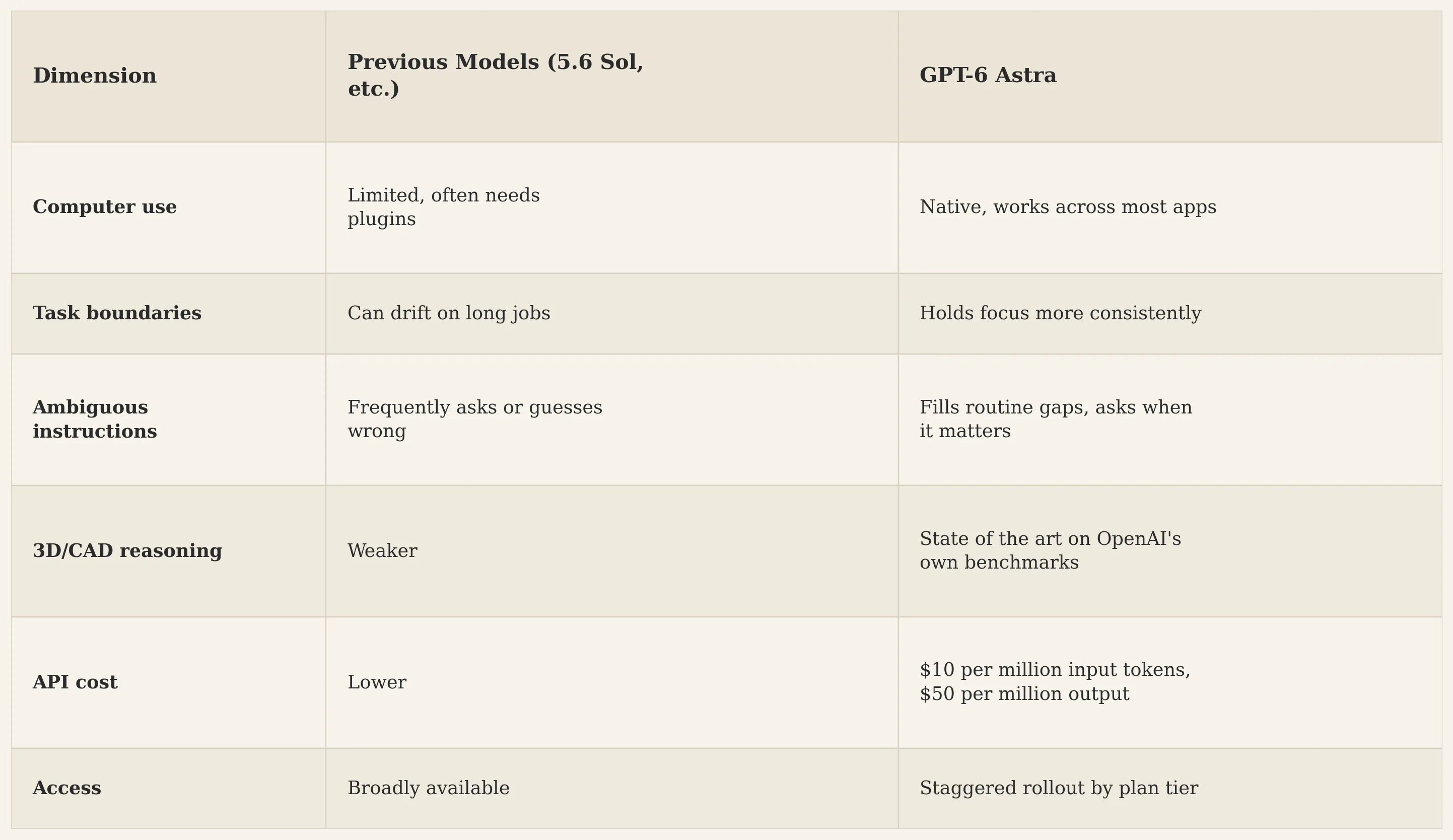
So what's actually new? A few things stand out. Astra is built to hold onto task boundaries better than earlier models, meaning it drifts less when a job runs long. It reads ambiguous instructions more carefully too, filling in routine gaps on its own and only stopping to ask when a decision genuinely needs your input. And it handles what OpenAI calls computer use noticeably better: clicking through real applications, navigating software that has no API, and completing multi-step tasks the way a person sitting at a keyboard would.
Why the Naming Is So Confusing
This is where a lot of users get tripped up, so let's untangle it.
Astra isn't a separate app. It's not a competitor sitting next to ChatGPT. It's the model working underneath certain parts of ChatGPT, and depending on where you're clicking, it goes by a different name.
Open a regular ChatGPT conversation on a Pro, Business, or Enterprise plan, and you'll find it listed as GPT-6 Pro in the model picker. Switch over to ChatGPT Work or Codex on a Plus plan, and there it's simply labeled Astra. Two names, one underlying model, two completely different menus. It's a strange choice from a branding standpoint, and it's caused a fair number of "where did it go" posts online.
Plus subscribers specifically do not get Astra in ordinary Chat mode. That's the detail that trips people up most. You get it through Work and through Codex, not through the chat window you're used to typing into every day.
Where to Find Astra Inside ChatGPT
Access depends entirely on your plan, and the rollout hasn't hit every account at the same time.
Pro, Business, and Enterprise users: open a new chat, check the model dropdown, and look for GPT-6 Pro. That's Astra, just under its Chat-mode name.
Plus users: you won't see Astra in normal Chat. Instead, switch the toggle at the top from Chat to Work, or open Codex from that same menu. On mobile, there's a Work option in the dropdown at the top of the screen.
Enterprise workspace admins: take note. Astra ships off by default for Enterprise accounts, so someone with admin rights needs to switch it on before anyone in the workspace can use it. Having an eligible company plan doesn't automatically mean every employee sees the option.
Developers: the API identifier is gpt-6-astra. It's also live through Microsoft Azure and AWS Bedrock. If you're using Codex through the command line, you'll need version 0.153.0 or newer, or the model simply won't appear.
Free-tier users: as of this writing, OpenAI hasn't confirmed any Astra access on the free plan, and given the pricing behind the model, it's unlikely to show up there soon.
If you've checked all of the above and still don't see it, don't assume your account is broken. This is a staged rollout, and OpenAI has said explicitly that being on an eligible plan doesn't guarantee same-day access. Updating your ChatGPT desktop app can also help, since older builds sometimes hide the option entirely.
What Astra Can Actually Do Differently
A few capabilities keep coming up across OpenAI's own materials and early hands-on reviews from people who got access ahead of the public rollout.
Stronger computer use. Astra can operate inside real desktop and web applications, not just generate text about them. That includes tools without an API, which used to be a hard wall for automation.
Better spatial and visual reasoning. OpenAI points to strong results on 3D and CAD-style benchmarks, and reviewers have described it building a house model that goes from a rough prompt to something walkable inside a game engine.
Sites, built from a prompt. Inside ChatGPT, Astra can generate, host, and share a working website or small web app without you leaving the chat window.
Office and spreadsheet work. OpenAI has shown it completing financial modeling competition tasks far faster than the human record, using computer use rather than a plugin or add-on.
More reliable judgment under ambiguity. This one is harder to benchmark, but it shows up repeatedly in early user accounts: Astra seems to ask fewer unnecessary clarifying questions while also taking fewer wrong guesses on unclear instructions.
None of this means the model is flawless. Independent, large-scale testing takes time, and a few weeks of early access reviews is not the same as months of real-world use across millions of accounts.
Astra vs. Older ChatGPT Models
Is Astra Worth Switching To?
Depends on what you're using ChatGPT for.
If your work involves multi-step tasks inside actual software, spreadsheet-heavy analysis, or building things like websites or 3D assets from a written prompt, Astra is a genuine step up and probably worth chasing down through Work or Codex. If you mostly use ChatGPT for writing help, quick research, or everyday questions, you may not notice a dramatic difference yet, since those tasks were already well handled by earlier models.
Worth remembering: this is day-one territory. Pricing, access tiers, and even which ChatGPT surfaces carry Astra are all things OpenAI could adjust in the coming weeks. Treat anything you read right now, including this article, as a snapshot rather than a permanent state of affairs, and check OpenAI's own rollout page if you need the current picture.
Frequently Asked Questions
Is GPT-6 Astra a new app I need to download? No. It's a model running inside ChatGPT, Codex, and the API. There's nothing separate to install.
Why do I see "GPT-6 Pro" instead of "Astra" in my chat window? Regular ChatGPT conversations label the model GPT-6 Pro. Astra is the name used in Work and Codex. It's the same underlying model under two labels.
Do free ChatGPT users get Astra? Not currently confirmed. OpenAI's rollout announcement covered Plus, Pro, Business, and Enterprise only.
Why does my coworker have Astra and I don't, on the same plan? The rollout is staged, and Enterprise/Business workspaces require an admin to switch the model on. Two people on paper-identical plans can see different menus during this period.
Is Astra actually AGI? OpenAI leadership has used the term in public comments, but that's a claim, not an independent finding. Treat it as marketing language until outside researchers weigh in with their own testing.